


CASINO
Slot search
Open the casino area when you want searchable slot rooms, spin-feature titles or Fishing God. Filters remain near the category row, which reduces repeated movement through the full lobby.
Super Sic Bo, rocketpot, bingo4s and Fishing God sit one tap from the sonic77 account home, with DANA and QRIS status kept beside the lobby.
Access is available only where local law permits.
Casino and slots open from the first category row, with search kept visible on mobile screens.

Open the home lobby to find slots, streamed tables, fishing rooms and sportsbook markets beside your account and wallet status.
Pragmatic Play, PG Soft and Habanero appear alongside other studios, giving you direct category access from the Home casino row.
DANA, OVO, GoPay and QRIS appear as separate cashier choices rather than one generic wallet label.
The durable links on our Home page lead to areas you may need again after opening an account.
Open the casino area when you want searchable slot rooms, spin-feature titles or Fishing God. Filters remain near the category row, which reduces repeated movement through the full lobby.

Head to live casino for streamed baccarat, roulette, Dragon Tiger and blackjack context. Table access sits beside slots, making it easier to change categories without leaving the account home.

Football, badminton and basketball markets have their own sportsbook route from Home. You can inspect an event and return to casino categories through the same primary navigation row.

The cashier path shows the current state of DANA, OVO, GoPay, QRIS, virtual account and bank transfer actions. Receipt checks stay close when a provider confirmation is pending.
Your first visit should answer four practical questions: where to open an account, what verification is required, which lobby areas are available and where security settings…
Start from the account link on Home, enter the requested details and complete the phone verification step. We show the next account action only after that phone check is complete.
Your account panel keeps profile details, wallet status and access controls together. Confirm that your phone and account name are accurate before you send funds or request a withdrawal.
The main category row opens casino, slots, live tables and sportsbook markets. Named titles such as Super Sic Bo, erek23 and Fishing God can be found through lobby search.
Use a private password, keep your verification code to yourself and leave the account through its exit control on shared devices. Account help remains available beside the access path.
Account help sits close to the two places where delays matter: access and cashier status. Open live chat for an active session issue, or use email when you need to include a receipt and transaction details. The mobile help path follows the same menu as the main Home page. Current service availability appears in the chat panel before you begin.
Use live chat when phone verification, account access or wallet status stalls during an active session. The panel displays current service availability and keeps the conversation near your account route.
Choose email for receipt checks or cases requiring written transaction details. Include the relevant wallet rail, transaction state and account reference, but never send your password or verification code.
On a phone, open help from the account menu without leaving the main navigation path. You can return to the cashier or lobby after checking the response and next action.
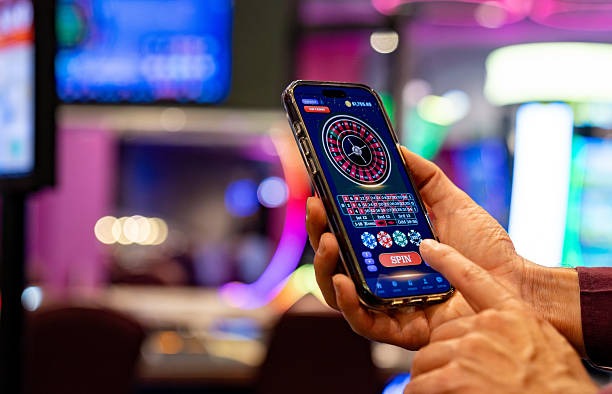
The phone layout keeps account access, lobby search and cashier status in one vertical path.
Phone verification creates a clear checkpoint before full account access. On shared devices, you can leave through the account exit control instead of relying on a closed browser…
Searching through disconnected messages or offline recommendations can leave account steps, game links and wallet instructions out of sync.
| Account entry | Home presents one account route with phone verification before access. Scattered links may skip that context or send you directly toward a page without showing the required account step. |
|---|---|
| Casino categories | The current category row separates slots, live casino, fishing and sportsbook areas. An offline recommendation may name a title without showing where it sits or whether it is currently available. |
| Wallet state | Cashier status remains attached to DANA, OVO, GoPay, QRIS or the selected bank route. A forwarded instruction cannot display the live state of your own transaction. |
| Receipt checks | The help route lets you connect a receipt question with the relevant wallet and account reference. Informal advice cannot inspect your transaction record or provider confirmation state. |
| Current policies | Home links to the account conditions and privacy terms currently presented by us. Saved screenshots or copied messages can omit eligibility wording and later changes to an account process. |
| Device continuity | Phone, tablet and large-screen layouts preserve the same account-to-lobby sequence. A collection of separate bookmarks can make navigation differ each time you change screens or categories. |
Return data and game rules belong to the individual title, not to a broad Home-page promise.
Check the displayed return data and feature rules inside each slot panel.
Read the table rules and available wager ranges before joining a round.
Inspect table-specific rules, stream state and available wager values.
Use the in-game rules to understand controls and result mechanics.
Read the title panel for multiplier mechanics and round timing.
Our Home page is configured for Indonesia, with DANA, OVO, GoPay and QRIS shown beside bank transfer and virtual account routes. The phone layout and English en-ID copy use the same account flow across supported locations. Availability depends on local law, your eligibility and the status of the selected service. Check the access terms linked from Home before creating an account or entering the casino, live-table or sportsbook areas.
Six visible elements make Home useful after your first visit: a verified account route, searchable casino categories, streamed table access, Indonesia wallet choices, sportsbook links and…
Phone verification appears before account access, giving you a defined first step. The account panel then connects profile details, wallet status and the main casino categories from one location.
Mobile search helps you reach titles such as rocketpot, bingo4s and Fishing God without scanning every category. The search control remains near the broader casino and slot filters.
Live baccarat, roulette, Dragon Tiger and blackjack sit in a dedicated table area beside slots. Each table interface presents its stream state, rules and available wager values.
DANA, OVO, GoPay and QRIS have distinct cashier choices, with bank transfer and virtual account available separately. The selected route keeps its transaction status and receipt-check path visible.
Football, badminton and basketball markets open through the sportsbook link on Home. You can move back to casino areas without beginning a separate account session or searching for another entrance.
Live chat, email and mobile help sit near account and cashier routes. That placement gives you a direct next action when verification, login or a provider status has stalled.
These answers cover the questions most often raised before using the sonic77 Home page: account access, lobby contents, Indonesia wallet routes, mobile behaviour, withdrawal checks and support. They point to the exact Home area involved so you can verify the next step rather than relying on a copied link or old message.
Begin at the account panel if you need to create or verify your profile. Once access is active, use the category row for casino, slots, live tables or sportsbook markets.
Select the account link on Home, provide the requested details and complete phone verification. After that checkpoint, the account panel displays the available lobby and wallet routes.
Use casino search for slots and fishing titles, live casino for streamed tables, or sportsbook for football, badminton and basketball markets. Each route remains connected to Home navigation.
Choose a single wallet or bank route and follow its on-screen confirmation. Return to the status panel before repeating an action, because a provider response may still be pending.
Use live chat for an active access issue and email for a receipt case needing written details. Mobile help opens from the same account menu used to reach Home.